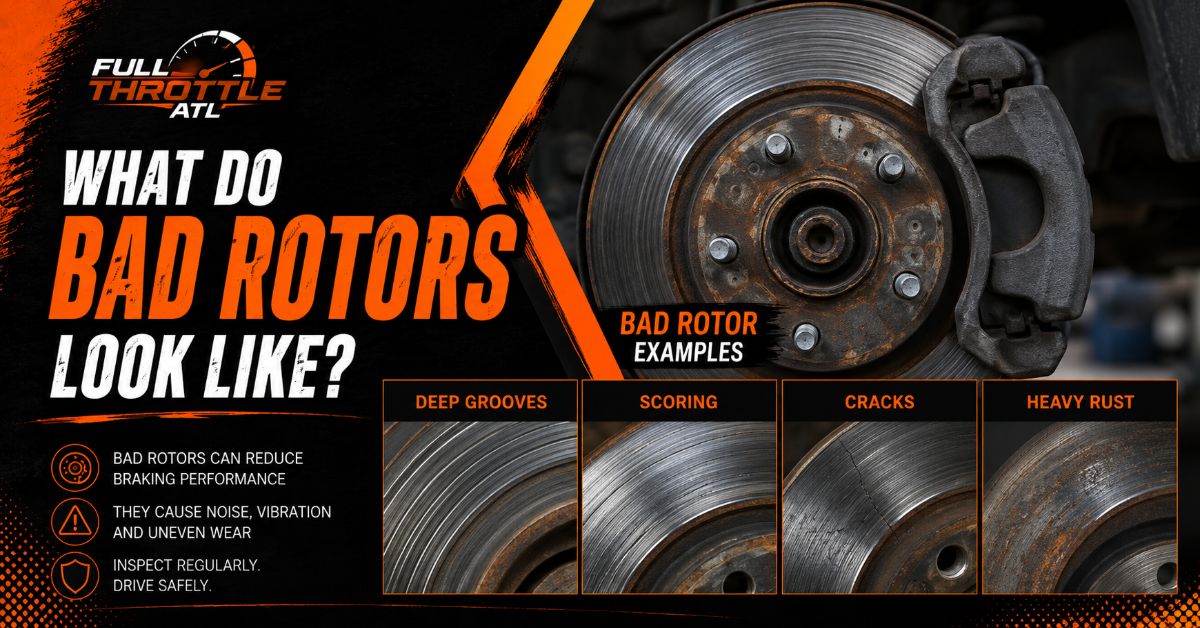
Bad brake rotors typically display deep circular grooves, blue or purple heat discoloration, severe edge rust scaling, fine surface cracks, or a pronounced raised lip on the outer circumference. Physical damage, thermal stress, and metal erosion cause these visible defects, compromising stopping power and safety.
At a Glance
- Deep grooves on the rotor face that catch a fingernail indicate abrasive damage from worn brake pads or debris.
- Dark blue or purple spots reveal extreme heat stress that creates hardened, uneven patches in the cast iron.
- Thick, flaking orange rust scale on the outer edges and internal vanes weakens structural integrity beyond cosmetic oxidation.
- Fine hairline fractures radiating across the surface signal imminent structural failure from severe thermal cycling.
- A rotor can appear smooth and shiny while still suffering from invisible thickness variation that causes pedal pulsation.
What Are the 5 Main Visual Signs of a Damaged Brake Rotor?
Damaged brake rotors exhibit five distinct visual defect patterns during a routine wheel-off inspection: surface scoring, heat spots, heavy rust scaling, structural cracks, and outer perimeter lip formation. Recognizing these visual markers allows vehicle owners to address braking degradation before total friction material failure occurs.
1. Scoring and Circular Grooving
Severe scoring appears as deep, concentric channels along the friction track of the disc, resembling the grooves of a vinyl record. While light, uniform wiping marks are normal during standard pad engagement, deep channels that easily catch a fingernations (deeper than 0.5 mm) signal severe wear. This damage happens when brake pad friction material wears down to its metal backing plate or when road debris becomes lodged between the pad and rotor.
2. Heat Spots and Thermal Discoloration
Heat spots appear as dark blue, purple, or dark orange patches scattered across the silver metal surface. These discoloration bands indicate that the friction face experienced temperatures exceeding 600°C (1,112°F). Thermal stress alters the microscopic grain structure of cast iron, converting localized areas into ultra-hard martensite. These hard spots wear slower than surrounding metal, creating permanent high points that trigger severe brake pedal pulsation.
3. Deep Rust Scaling and Edge Pitting
Rust scaling appears as thick, dark brown or orange crust flaking off the rotor edges, hub mounting hat, and cooling vents. Distinguish this from thin, flash rust that forms overnight after rain. Flaking rust scale erodes structural integrity, closes internal cooling passages, and expands to push friction pads away from the disc surface.
4. Surface Hairline Fractures and Crack Lines
Rotor cracks appear as thin, dark lines cutting across the smooth friction surface. Fine hairline cracks frequently originate around the cross-drilled holes of performance rotors due to stress concentration. Deep structural cracks extending to the outer edge or inner hub require immediate replacement, as centrifugal forces can shatter a fractured rotor during hard stopping.
5. Raised Perimeter Edge Lip
A pronounced, raised ridge along the outermost edge of the rotor disc indicates substantial overall metal wear. As brake pads compress against the swept area, they continuously shave down the metal, while the untouched outer rim retains its original factory thickness. If this lip exceeds 1.0 mm in height, the disc has likely worn past its engineered discard limit.
What Does a Cracked vs. Heat-Discolored Brake Rotor Look Like?
A cracked brake rotor features sharp, linear fracture lines cutting through the cast iron, whereas a heat-discolored rotor displays smooth, multi-colored blue or purple patches on the metal surface. Both conditions stem from thermal overload, but structural cracking represents an advanced stage of material failure compared to surface metallurgy changes.
Structural crack on an oxidized rotor face. Source: Supersmario / Getty Images
Thermal discoloration and blue heat spots. Source: EBC Brakes / Brake Rotor Hot Spots and Brake Dust – Common causes and cures …
Heat discoloration develops first when aggressive braking or a dragging caliper holds friction temperatures above design limits. The metal shifts color from light straw yellow to deep blue as oxidation thickens on the surface layer.
If thermal cycling continues without cooling periods, localized expansion stress forces micro-cracks to form along grain boundaries. Cracked rotors cannot be turned on a lathe, as machining across a fissure weakens the remaining structure; heat-discolored rotors can occasionally be turned if hard spots have not penetrated too deep into the casting.
What Is the Difference Between Normal Surface Rust and Severe Rust Scaling?
Normal surface rust appears as a uniform, bright orange film that wipes off easily, whereas severe rust scaling forms a thick, dark, flaking crust that pitted and eats into the cast iron disc. Surface rust is cosmetic and transient, while rust scaling represents permanent structural erosion.
Cast iron oxidizes quickly when exposed to moisture and air. A vehicle parked outdoors during humid conditions will form a thin layer of flash rust on the rotor face within hours. This superficial layer rubs off harmlessly during the first two or three brake applications.
Conversely, severe rust scaling develops over months of vehicle inactivity or exposure to road salt. The oxidation expands up to eight times the volume of the original metal, causing “rust jack”—where flaking crust separates the friction surface, damages pad backing plates, and restricts airflow through internal cooling channels.
Can a Bad Brake Rotor Look Completely Smooth and Shiny?
Yes, a bad brake rotor can appear perfectly smooth, shiny, and undamaged while still suffering from severe geometric defects like lateral runout or disc thickness variation (DTV). Naked-eye visual inspection fails to catch sub-millimeter manufacturing defects, warping, or uneven pad deposits that cause violent vibration.
      LATERAL RUNOUT (Wobble)            DISC THICKNESS VARIATION (DTV)

        /  <-- Rotor disc face             |  | <-- Thicker section
       /       wobbles side-to-side        |  |
      /        during rotation             |  | <-- Thinner section
                                           |  |
When a driver reports a vibrating brake pedal or steering wheel shake during braking, the root cause is rarely a visibly warped disc. Instead, it is typically one of two invisible mechanical failures:
- Lateral Runout: The rotor does not rotate on a plane strictly perpendicular to the wheel hub axis. Even a deviation greater than 0.05 mm (0.002 inches) causes the disc to wobble as it spins, knocking the brake pads back and forth inside the caliper body.
- Disc Thickness Variation (DTV): The rotor face lacks uniform thickness around its circumference. If one section of the disc is thin (e.g., 27.8 mm) and another section is thick (e.g., 28.0 mm), the caliper piston pulses inward and outward with every wheel revolution, sending hydraulic shocks back into the brake pedal.
What Does Internal Cooling Fin Collapse Look Like on Ventilated Rotors?
Internal cooling fin collapse appears as heavy, crumbling rust debris filling the hollow vents located between the inner and outer faces of a ventilated brake rotor. While the two friction faces might look smooth, the internal structural vanes completely oxidize and disintegrate from the inside out.
  OUTER FACE           VENTILATION VANES           INNER FACE
+-------------+     +---------------------+     +-------------+
|             |     |  |   |   |   |   |  |     |             |
| Smooth Area | === | Corrosion Crumbles  | === | Smooth Area |
|             |     |  |   |   |   |   |  |     |             |
+-------------+     +---------------------+     +-------------+
Ventilated rotors rely on internal cooling vanes to draw ambient air from the center hub outward through centrifugal force, dissipating heat during braking. In high-humidity regions or areas using chemical road de-icers, moisture collects inside these internal passages.
As iron vanes rust away, the rotor loses its structural support and thermal mass. Under heavy braking pressure, the unsupported outer face can collapse inward toward the inner face, resulting in instantaneous pedal loss, structural shattering, and wheel lockup.
What Does Uneven Wear Between Inner and Outer Rotor Faces Indicate?
Uneven wear between the inner and outer faces—such as an inner face covered in heavy rust while the outer face remains mirror-shiny—indicates stuck caliper slide pins or a seized caliper piston. This condition proves that braking force is being applied to only one side of the rotor disc.
On single-piston floating caliper systems, the caliper housing must slide freely on greased guide pins to center itself over the rotor. If the slide pins seize due to corrosion or dried grease, the caliper cannot pull the outer pad against the outer disc face. The inner pad delivers 100% of the stopping force, causing rapid inner face grooving, severe overheating, and premature wear, while the un-swept outer face rusts away completely.
What Rotor Measurements and Specs Determine Replacement?
A rotor must be replaced when its discard thickness falls below the manufacturer’s minimum specification stamped on the hub, or when runout and thickness variation exceed microscopic tolerance limits. Visual inspections must always be validated using a precision micrometer and dial indicator.
| Defect / Measurement Metric | Standard Specification Limit | “Bad” / Discard Limit Threshold | Primary Action Required |
| Nominal Rotor Thickness | Varies by make (e.g., 28.0 mm new) | Stamped on casting (e.g., 26.0 mm) | Replace disc immediately if below stamped limit. |
| Lateral Runout (Wobble) | Less than 0.05 mm (0.002 inches) | Exceeds 0.10 mm (0.004 inches) | Resurface disc on-car or replace disc. |
| Disc Thickness Variation | Less than 0.01 mm (0.0004 inches) | Exceeds 0.015 mm (0.0006 inches) | Machine face flat or replace disc. |
| Groove / Channel Depth | Smooth to light wiping (<0.2 mm) | Exceeds 0.50 mm (0.020 inches) | Resurface if above min thickness, else replace. |
How Do Bad Rotors Ruin New Brake Pads?
Bad rotors ruin new brake pads by transferring their damaged surface profile directly onto the fresh friction block, causing uneven wear, reduced contact area, and thermal glazing. Installing new, flat brake pads against a grooved or lip-edged rotor reduces effective braking surface area by up to 60%.
When a flat pad presses against a grooved rotor, friction occurs only along the high ridges of the metal. This concentrates braking hydraulic pressure onto narrow strips of the pad material, creating extreme localized heat. The resin binders inside the new pad break down and melt, coating the pad surface in a slippery, crystallized layer known as pad glazing. Additionally, the outer rust lip on an un-resurfaced rotor gouges the edge of the new pad, causing structural cracking and high-frequency brake squeal.
What Is the Difference Between Rotor Glazing and Pad Material Transfer?
Rotor glazing is a mirror-like, vitrified surface layer caused by melted pad resins, whereas pad material transfer appears as dark, patchy, raised smudges of friction compound bonded onto the disc. Glazing reduces friction coefficient, while uneven material transfer creates pedal vibration.
       ROTOR GLAZING                      PAD MATERIAL TRANSFER
+--------------------------+           +--------------------------+
| Mirror-like, shiny film  |           | Dark, raised patches     |
| Low friction / Squeal    |           | Uneven friction / DTV    |
+--------------------------+           +--------------------------+
- Rotor Glazing: Occurs when light, continuous braking heat converts friction material resins into a smooth glass-like coating over the rotor disc. The surface feels slippery to the touch, and stopping distance increases significantly despite normal pedal pressure.
- Pad Material Transfer: Occurs when a driver performs a hard stop, heats the brakes thoroughly, and then holds the brake pedal down firmly at a complete standstill. The hot pad imprints a layer of friction material directly onto one spot of the disc face, creating a high point that causes pedal pulsation during subsequent stops.
Can You Put New Brake Pads on Old Rotors Without Resurfacing Them?
Putting new brake pads on old rotors without resurfacing or replacing them—a practice known as “pad-slapping”—is strongly discouraged by professional brake technicians. While technically possible if the old rotor exceeds minimum thickness specs and shows zero vibration, pad-slapping leads to noise, poor initial stopping power, and shortened component lifespan.
New brake pads require a flat, non-directional finish (typically achieved with an 80-grit cross-hatch pattern on a lathe) to properly transfer friction material during the bedding-in process. An old, un-machined rotor features a hardened, glazed surface layer and microscopic ridging. Fresh pads cannot bed properly against this hardened surface, resulting in long pedal travel, glazing, persistent squealing, and premature pad failure.
Which Types of Brake Rotors Cannot Be Turned or Resurfaced?
Cross-drilled rotors, slotted rotors, heavily rusted rotors, and thin European OEM rotors generally cannot or should not be turned on a standard brake lathe. Machining these specialized designs risks damaging the cutting bit, shattering the disc, or reducing metal volume below safe thermal limits.
+---------------------------+-------------------------------------------------------------+
| Rotor Type                | Resurfacing / Turning Viability                             |
+---------------------------+-------------------------------------------------------------+
| Blank Cast Iron Rotors    | CAN BE TURNED (if remaining metal > discard limit)          |
| European OEM Rotors       | CANNOT BE TURNED (engineered near discard limit from factory)|
| Cross-Drilled Rotors      | CANNOT BE TURNED (lathe bit catches and chips drill holes)  |
| Slotted Performance Discs | REQUIRE SPECIALIZED EQUIPMENT (standard bits chatter)        |
| Heavily Scaled Rotors     | CANNOT BE TURNED (rust ruins tool bits and weakens metal)   |
+---------------------------+-------------------------------------------------------------+
- European OEM Rotors: Manufacturers like BMW, Mercedes-Benz, and Audi design lightweight rotors with tight thickness tolerances. They typically start only 1.5 to 2.0 mm above minimum thickness, leaving insufficient metal for lathe resurfacing.
- Cross-Drilled and Slotted Rotors: Standard lathe cutting bits chatter and catch on the edges of holes and slots, leading to cracked bit tips and uneven surface gouges. Resurfacing these requires specialized high-speed micro-vibration lathes.
- Rust-Scaled Rotors: Extreme rust pits dull lathe bits instantly, and removing enough metal to clear deep rust pitting thins the disc beyond legal discard limits.
Why Do New Brake Rotors Rust Within Weeks of Installation?
New brake rotors rust within weeks of installation because uncoated cast iron oxidizes rapidly when exposed to atmospheric humidity, rain, and road salts. Unless you purchase rotors protected by specialized geometric coatings or zinc plating, non-contact areas will rust quickly.
Uncoated replacement rotors arrive protected only by a light film of shipping oil, which must be cleaned off with brake cleaner prior to installation. Once that oil layer is removed, exposed iron on the hat hub and cooling vanes reacts with oxygen and ambient moisture.
To prevent cosmetic rust, select premium fully coated rotors. These feature a baked-on zinc or aluminum-polymer coating (such as GEOMET®) that withstands thermal cycles and protects non-swept surfaces from corrosion throughout the component’s lifespan.
What Happens If You Continue Driving on Bad Brake Rotors?
Driving on bad brake rotors increases stopping distance, causes severe brake fade, damages wheel bearings and suspension linkages, and risks catastrophic rotor shattering during emergency braking. Neglecting visible rotor defects converts an inexpensive maintenance service into a major mechanical overhaul.
       BAD ROTORS (Grooved / Warped / Thin)
                       │
                       ▼
       HYDRAULIC & THERMAL OVERLOAD
       (Brake fade, pad glazing, heat transfer)
                       │
                       ▼
       MECHANICAL VIBRATION & STRESS
       (Steering shake, premature suspension wear)
                       │
                       ▼
       CATASTROPHIC SYSTEM FAILURE
       (Rotor shattering, caliper pin lockup, total pedal loss)
As a rotor thins down past its engineered discard limit, its thermal heat-sink capacity drops dramatically. During repeated stops, the thin iron overheats rapidly, boiling the brake fluid inside the caliper and causing complete pedal loss (brake fade).
Simultaneously, severe lateral runout forces continuous vibrations through the wheel hub, causing premature wear on wheel bearings, tie-rod ends, and control arm bushings. In extreme cases, deep surface cracks or heavily grooved rotors can shatter under sudden panic-stop hydraulic pressures, locking the wheel and causing total loss of vehicle control.
The Bottom Line
Identifying what bad brake rotors look like requires checking for visual indicators like deep grooving, heat discoloration, flaking rust scale, fine cracks, and outer perimeter lips. However, because invisible issues like lateral runout and disc thickness variation can cause severe vibration on smooth-looking rotors, visual checks must be paired with precision micrometer measurements. Replacing thinned or damaged rotors promptly protects your brake pads, suspension components, and emergency stopping capability.